
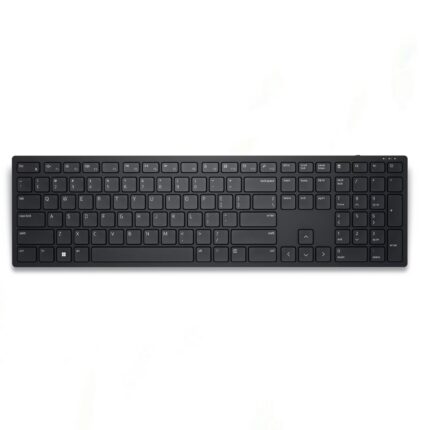
Dell Wireless Keyboard KB500: A Comprehensive Review
The Dell Wireless Keyboard KB500 is more than just a device; it’s an essential tool for anyone seeking to enhance productivity and streamline their workspace. With a sleek design and user-friendly features, this keyboard is perfect for professionals, gamers, and casual computer users alike. This article will delve into the key features and benefits of the Dell Wireless Keyboard KB500, helping you decide if it’s the right fit for your needs.
Design and Aesthetics
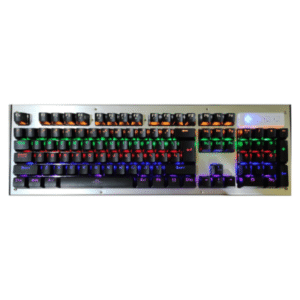
One of the standout features of the Dell Wireless Keyboard KB500 is its modern and minimalist design. The keyboard sports a low-profile layout that not only enhances comfort during long typing sessions but also adds a touch of elegance to your workspace. The keys are well-spaced, allowing for convenient touch typing, while the matte finish ensures it stays looking clean and professional. This design is not just visually appealing; it’s practical too, making it an ideal choice for any environment, from a home office to a corporate setting.
Wireless Connectivity and Range
One of the most significant advantages of the Dell Wireless Keyboard KB500 is its wireless capability. Utilizing a reliable 2.4GHz wireless connection, the keyboard provides a stable and lag-free experience. You can connect effortlessly via USB, simply plug in the receiver and you’re good to go. With a wireless range of up to 10 meters, you can enjoy the freedom to move around your workspace without being tethered to your computer. This feature is particularly beneficial for those who prefer a more flexible and untangled setup.
Key Features of the Dell Wireless Keyboard KB500
The Dell Wireless Keyboard KB500 is loaded with features that enhance its functionality and user experience:
1. Quiet Typing: One of the most appreciated features is its quiet keystrokes, making it suitable for shared work environments where noise can be a distraction.
2. Battery Life: The keyboard offers impressive battery life, lasting for several months on a single pair of AAA batteries. This long-lasting performance means you can work without the constant worry of changing batteries.
3. Multimedia Shortcuts: It includes several multimedia shortcut keys that allow you to control audio and video playback conveniently. These shortcuts enhance the user experience, making it easy to switch between tasks with just one touch.
4. Compatibility: The Dell Wireless Keyboard KB500 is compatible with a wide range of operating systems, including Windows and Linux, making it a versatile choice for various users.
5. Ergonomics: Designed for comfort, the keyboard boasts a low-profile design that promotes better wrist positioning and reduces strain during extended use.
Performance and User Experience
When it comes to performance, the Dell Wireless Keyboard KB500 truly shines. The typing experience is responsive, with a tactile feel that allows for precise input. Whether you’re composing an email, coding, or gaming, the keyboard keeps up with your speed and accuracy. Users have praised the keyboard for its ability to minimize typing fatigue, thanks to its ergonomic design and quiet operation.
The simple setup process adds to the overall positive user experience. In just a few seconds, anyone can have it up and running without needing extensive technical knowledge. This ease of use makes the Dell Wireless Keyboard KB500 a fantastic option for individuals who want a reliable keyboard without complexities.
Conclusion: Is the Dell Wireless Keyboard KB500 Right for You?
In summary, the Dell Wireless Keyboard KB500 is an excellent choice for anyone looking for a reliable, stylish, and efficient keyboard. With its impressive wireless connectivity, ergonomic design, and range of user-friendly features, it can adapt to a variety of needs—whether for professional use, gaming, or casual browsing.
With the focus keyword naturally woven throughout this review, it’s clear that the Dell Wireless Keyboard KB500 stands out in today’s crowded market. If you prioritize functionality combined with sleek design, this keyboard could be the perfect addition to your setup. Consider your specific needs, and invest in a device that promises to enhance your typing experience for many years to come.
Reviews
There are no reviews yet.